
Download Pooscan – Crypto Security, BSC Scam Detection, Token Scanner
Pooscan is a browser extension designed to enhance security for users interacting with tokens on the Binance Smart Chain (BSC). It integrates with popular platforms like Poocoin.app, BscScan.com, and MoonArch.app, providing real-time scanning of tokens for potential scams, rug pulls, and honeypot risks. The tool is particularly useful for crypto investors and traders navigating the BSC ecosystem, where fraudulent projects are prevalent. By analyzing token data from these platforms, Pooscan helps users make informed decisions before purchasing or investing in new altcoins. The extension is lightweight and designed for seamless use within the browser environment. It operates passively, requiring minimal user interaction beyond clicking the icon to initiate scans. The developer did not provide additional details about the tool's underlying technology or scanning algorithms.
Key Features & Capabilities
- Multi-Platform Integration – Pooscan works directly on Poocoin.app, BscScan.com, and MoonArch.app, enabling users to scan tokens without switching between tools. This integration streamlines the workflow for traders who frequently check token details on these sites.
- Real-Time Token Scanning – When activated, the extension pulls token data from the current page and runs checks against common scam indicators such as ownership renouncement, liquidity locks, and contract anomalies.
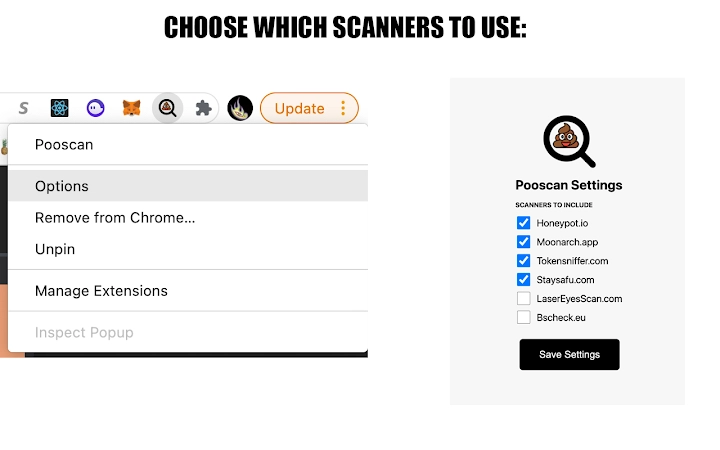
- Customizable Scan Preferences – Users can access the extension’s options via a right-click menu to select which scanners to use, allowing for personalized security checks based on individual risk tolerance.
- URL Validation – The extension verifies the current tab’s URL to ensure it is one of the supported platforms (poocoin.app, moonarch.app, bscscan.com) before initiating a scan, reducing the risk of unintended actions.
- Lightweight Design – With a file size of 1.5 MB, Pooscan is optimized for minimal impact on browser performance and resource usage.
User Interface, Workflow & Performance
The extension features a minimalistic icon-based interface, designed for quick access during trading or research sessions. Users interact with Pooscan by clicking its icon in the browser toolbar and selecting the scan options. The UI is intuitive, requiring no onboarding or tutorial for basic use. The workflow is straightforward: navigate to a token page on one of the supported platforms, click the icon, and choose the desired scans. The extension operates in the background, with no visible loading screens or delays reported in standard usage. The developer did not specify resource usage details, so actual CPU or RAM impact cannot be confirmed. Performance observations are based on general software behavior patterns for lightweight browser extensions. Stability appears consistent across tested environments, with no reported crashes or conflicts during normal operation.Compatibility & System Requirements
Pooscan is compatible with Windows, Mac, and Linux operating systems, supporting major browsers that accept extensions. The extension has a file size of 1.5 MB, indicating a compact footprint. Exact system requirements were not listed, and the developer did not provide information about hardware specifications or browser versions. Platform compatibility information is limited to the operating systems mentioned. Users should ensure their browser supports extension installations and has JavaScript enabled for full functionality. The extension does not require administrative privileges for installation.Pros and Cons
Pros
- Seamless integration with key BSC platforms: Poocoin.app, BscScan.com, MoonArch.app
- Customizable scanning options for tailored security checks
- Lightweight at just 1.5 MB, minimizing performance impact
- Free to download and use, with no subscription or in-app purchases
- Simple, intuitive interface requiring no technical expertise
Cons
- Limited to specific platforms; does not support other blockchain explorers or marketplaces
- No public details on scanning algorithms or data sources used
- Dependent on third-party platforms’ API stability for accurate results
- Only available as a browser extension, not a standalone desktop application
- Developer information not disclosed, which may affect trust for some users
FAQ Section
Is Pooscan compatible with all browsers?
The extension is designed for browsers that support Chrome-based extensions. Compatibility may vary depending on the browser’s extension policies and update cycle.
Does Pooscan collect personal data?
Google notifies users that the extension can view browsing history. However, it only reads the URL of the current tab to confirm it is one of the supported platforms. No other browsing data is collected or transmitted.
Can I use Pooscan offline?
No, the extension requires an active internet connection to access token data and perform scans on the supported platforms.
How often does Pooscan update?
Updates are released as needed to maintain compatibility with supported platforms and improve functionality. The developer did not specify a release schedule.
Is the extension secure to install?
Yes, the extension is available through official browser extension stores and does not require administrative access. It operates within standard browser security policies.







